How to Get Started with Amplify for Amazon Ads Management
If you’re planning to work with Amplify to manage Amazon Ads for your books, the setup process is straightforward. This guide outlines the steps required so we can begin building and launching campaigns.
Compared to many other advertising platforms, getting started with Amazon Ads tends to be less complex for publishers. Because ads run directly within Amazon and promote existing product pages, many of the onboarding steps required for advertising on other platforms (such as preparing book descriptions, creative assets, or sharing cover designs) are not necessary. In addition, there is no need for additional landing pages or tracking pixels
While there is significant work involved on our end in auditing accounts, conducting keyword research, structuring campaigns, and optimizing performance, the initial steps required from publishers are relatively simple.
We created this guide to remove uncertainty about the onboarding process and make it easy for new partners to get started. Most publishers can complete the steps below quickly once the necessary information is gathered.
Once these steps are completed, our team can begin auditing your account, preparing campaigns, and launching ads according to the agreed timeline and budget.
Amazon Ads Agency Setup Checklist
Before campaigns can launch, we will need:
Access to your Amazon Ads account
A confirmed budget and launch timeline
A spreadsheet of the books (ASINs) you’d like to advertise
Access to Vendor Central analytics (if applicable)
Once these pieces are in place, we can begin building campaigns and preparing your advertising strategy.
Step 1: Grant Access to Your Amazon Ads Account
The first step is giving our team access to your Amazon Ads account so we can audit existing campaigns and begin preparing new ones.
There are two ways to do this.
Option 1: Provide the Email Address of an Account Admin
If you prefer, you can provide us with the email address of an administrator for your Amazon Ads account. We will send a request for agency access.
Option 2: Provide Your Amazon Ads Account ID
Alternatively, you can provide your Amazon Ads Account ID. To find this:
Log in to Amazon Ads
Look at the URL in your browser
Copy the portion of the URL that begins with ENTITY, followed by a 12-digit alphanumeric identifier
Send this identifier to us and we will request agency-wide access to the account.
Timing
We typically request access at least two weeks before ads are scheduled to begin. This allows us time to:
Audit the ad account
Review past campaign performance (if applicable)
Conduct keyword and category research
Build campaign structures for launch
Our goal is to have campaigns fully prepared so they can launch on the approved start date and with the budget that has been agreed upon.
Step 2: Confirm Budget and Timeline
Before building campaigns, we need to confirm the initial advertising budget and timeline. This does not require a formal document. Any of the following works well:
A Google Sheet
An Excel spreadsheet
A simple email confirming the budget
We typically confirm at least the first month’s advertising budget so campaigns can be structured appropriately.
Knowing the budget allows us to determine:
How many titles to promote initially
Campaign structure and bidding strategy
How aggressively to test keywords and audiences
Step 3: Provide a Spreadsheet of Titles to Advertise
Next, please provide a list of the books you’d like to promote in the first phase of advertising. For many publishers, the easiest way to do this is by sharing a spreadsheet (Google Sheets or Excel) that lists the books you would like to advertise.
However, this step is flexible.
If your catalog includes fewer than about 50 books, a formal spreadsheet may not be necessary. In that case, simply sending us a list of the titles or ASINs you’d like to prioritize is usually sufficient.
If creating a spreadsheet feels confusing or time-consuming, another option is to export your catalog directly from Amazon and send that file to us as a starting point. We can organize and refine the information from there.
If your team is able to export a spreadsheet for us, we recommend one row per book, with separate columns for each format and the following information.
Recommended Spreadsheet Columns
ASIN – Hardcover
ASIN – Paperback
ASIN – Kindle
ASIN – Audiobook (if applicable)
Title
Subtitle
Series Name (if applicable)
Author Last Name
Author First Name
Publication Date
Price
BISAC Code 1
BISAC Code 2
BISAC Code 3
Imprint
Genre / Topic / Category
Additional Notes (optional)
Examples of helpful notes include:
Priority titles
Overstock inventory
Limited availability
Seasonal relevance
Upcoming promotions
Titles with strong existing sales
This information helps us structure campaigns, conduct keyword research, and prioritize which titles to advertise first. To make this easier, we’ve created a simple spreadsheet template that you can use if you’d like. You can download it below:
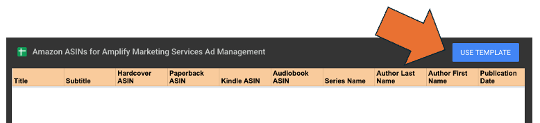
Google Docs Template (Click “Use Template” to copy and customize it)
Step 4: Grant Vendor Central Analytics Access (If Applicable)
If your titles are managed through Amazon Vendor Central, we also request access to the following reporting tools:
Brand Analytics
Retail Analytics
These reports provide valuable insight into how readers discover and purchase books, which helps inform keyword research and campaign strategy.
Currently, Vendor Central access must be granted one email address at a time, so we will provide the email addresses that need access.
Additional Information That Can Help Campaigns Launch Faster
The following information is not required but can help us plan campaigns more effectively.
Account Type
It is helpful for us to know how your books are managed within Amazon. Publishers typically operate through one of the following:
Vendor Central
Seller Central
Amazon Advantage
KDP
This helps us understand which reporting data and advertising tools are available.
Priority Titles
If there are specific books you want to prioritize in the initial phase of advertising, please note those in the spreadsheet or provide a short list separately.
Common priorities include:
New releases
Backlist titles with strong sales history
Titles with upcoming publicity or promotions
Books with strong seasonal relevance
Overstock titles in danger of large returns
Identifying priorities helps ensure advertising budget is focused where it can have the greatest impact.
What Happens Next
Once we have:
Amazon Ads account access
Budget confirmation
A spreadsheet of titles
Vendor Central analytics access (if applicable)
Our team will begin:
Conducting keyword and category research
Structuring advertising campaigns
Setting budgets and bidding strategies
Preparing campaigns for launch
From there, we focus on ongoing testing and optimization to improve performance over time.
Thank You for Partnering with Amplify
Thank you for partnering with Amplify. We appreciate the opportunity to work together and look forward to helping grow visibility and sales for your books through strategic Amazon advertising.
If you have any questions during the setup process, feel free to reach out. We’re always happy to help guide you through the next steps.