
Amazon Author Central: Best Practices for Setup & Optimization
Why it Matters
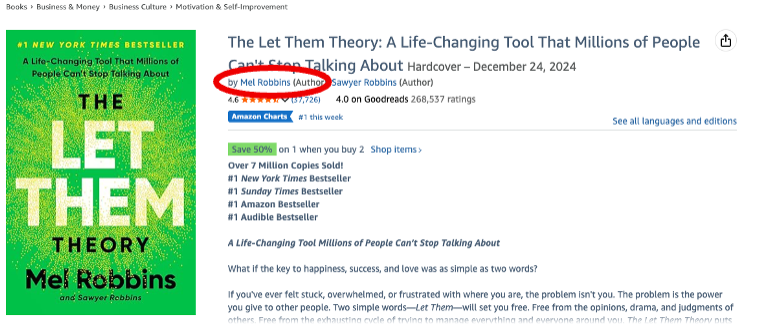
When a customer clicks the hyperlinked author name beneath a book title on Amazon, what they see next can strongly influence whether they buy your book or get distracted by someone else’s.
If you don’t have an Amazon Author Central page set up, that click leads to a generic Amazon search results page for your name. Those pages often include sponsored Amazon Ads at the top and may show books incorrectly attributed to you mixed in with your actual titles. This creates confusion and sends potential readers away from your work.
When you have an Amazon Author Central account and have claimed your books, clicking your name takes readers directly to your dedicated author page instead. That page contains no ads, shows only your verified books, and gives readers a clean, authoritative view of your work.
Another major benefit is discoverability over time: readers can follow your author page and subscribe to updates, which allows Amazon to notify them automatically when new books by you become available.

Steps to Take
Start by creating your account at https://author.amazon.com/
You’ll sign in using an existing Amazon account or create a new one specifically for author use. Once your account is active, you’ll need to claim your books. This step is critical; books do not automatically appear on your Author Central page.
Search for each of your titles within Author Central and request to claim them. Your publisher will then need to approve those claims before the books appear publicly on your page, so don’t be alarmed if there’s a short delay.
Be sure to claim every available format of each title, including Kindle editions, print editions (paperback and hardcover), and audiobooks. Each format is treated as a separate listing, and unclaimed formats may not display correctly on your author page.
What Author Central No Longer Supports
Amazon Author Central no longer supports sharing blog feeds, photos, or videos directly on author pages. While these features were available in the past, author pages are now limited primarily to your verified books, author photo, and bio. Because of this, it’s especially important to make sure those core elements are complete, accurate, and professionally presented.
Best Practices
Headshot Photo Best Practices
Your author photo is often the first personal connection a reader makes with you, so treat it as a professional branding asset. Use a high-resolution image with good lighting, a neutral or uncluttered background, and a clear view of your face.
The photo should reflect your genre and audience; approachable and warm for most nonfiction and trade titles, polished and professional for academic or business-focused works.
Avoid group photos, heavy filters, logos, or overly casual snapshots. As your career evolves, revisit your headshot periodically to keep it current, especially after major career changes, rebranding efforts, or shifts in your public-facing role.
Author Bio Best Practices
Your author bio should be clear, concise, and strategically structured. Many readers will only skim it, so every sentence should earn its place. Lead with who you are and what you write, followed immediately by the credentials or experience that establish your authority or relevance to the subject matter.
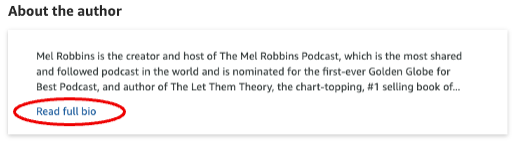
On Amazon Author Central, only the first approximately 300 characters of your bio are visible before a “Read Full Bio” link appears, and a significant number of readers never click beyond that preview. For that reason, your opening one to two sentences should do the most work; clearly communicating your positioning and value upfront rather than saving key information for later.
Avoid lengthy chronological histories or personal details that don’t directly support your credibility as an author. Instead, focus on qualifications, professional roles, subject-matter expertise, notable publications, or media appearances that matter to your audience.
Keep the tone aligned with your genre and readership, whether that’s authoritative, approachable, or narrative-driven.
Review and update your bio periodically to reflect new awards, degrees, certifications, job titles, leadership roles, or other meaningful accomplishments. An outdated bio can quietly undermine credibility, while a refreshed one reinforces momentum and professionalism.
Conclusion
Amazon Author Central is one of the few places on Amazon where authors have direct control over how they are presented to readers. Taking the time to set it up correctly, claim every format of your books, and keep your photo and bio current helps ensure that interested readers see an accurate, professional snapshot of you and your work—without distractions, ads, or misattributed titles. While Author Central may seem like a small detail, it plays an outsized role in discoverability, credibility, and long-term reader engagement.
If you’d like more guidance on building a strong author presence beyond Author Central, we encourage you to explore our free online video course, Author Advantage. The course walks through additional best practices authors can use to strengthen their platform, improve visibility, and support their books over time.